

Ask a designer what’s essential to their process right now and you’ll get a very different answer than you would have a year ago. Coffee, a decent mouse, a pack of Sharpies, sure. But increasingly, a stack of AI tools that didn’t exist twelve months ago, layered inside the tools that did.
That pace of change is a growing problem if you’re the one hiring a design team and not just the one sitting at the desk. What the report won’t tell you is that the designers thriving in this shift are the ones who stop waiting for a plugin to exist and build it directly into their canvas. That only happens when a designer is skilled enough to build it and enabled, through real governance, to do it safely. That combination is exactly what you’re vetting for when you hire a partner.
The Tool Landscape is Moving Faster Than Most Governance Models
The AI in Design 2026 report from Designer Fund and Foundation Capital puts hard numbers on what’s been anecdotal until now. Weekly AI use among designers jumped from 54% to 91% in a single year. The average designer’s AI toolstack more than doubled, from 3 tools to 7. Claude has overtaken ChatGPT as designers’ primary general AI tool, and 65% of designers surveyed are now using Claude Code specifically, a tool that didn’t exist in last year’s report at all.
I felt that number before I saw it. I spent this past year running a weekly AI Study Hall with our designers, half experimentation, half figuring out where these tools actually belonged in our workflows versus where they just felt exciting. More than once, a Figma release changed something out from under a system I was mid-build on, and the only fix was to close the laptop and take a walk. Decision fatigue is real because there isn’t a settled answer yet for which tools deserve a permanent seat at the table.
None of that is inherently risky. What’s risky is what tends to happen underneath fast tool turnover at scale: shadow IT, inconsistent output quality, and no clear answer to “who approved this tool for use on our project.”
The Stat That Matters for Enterprise Buyers
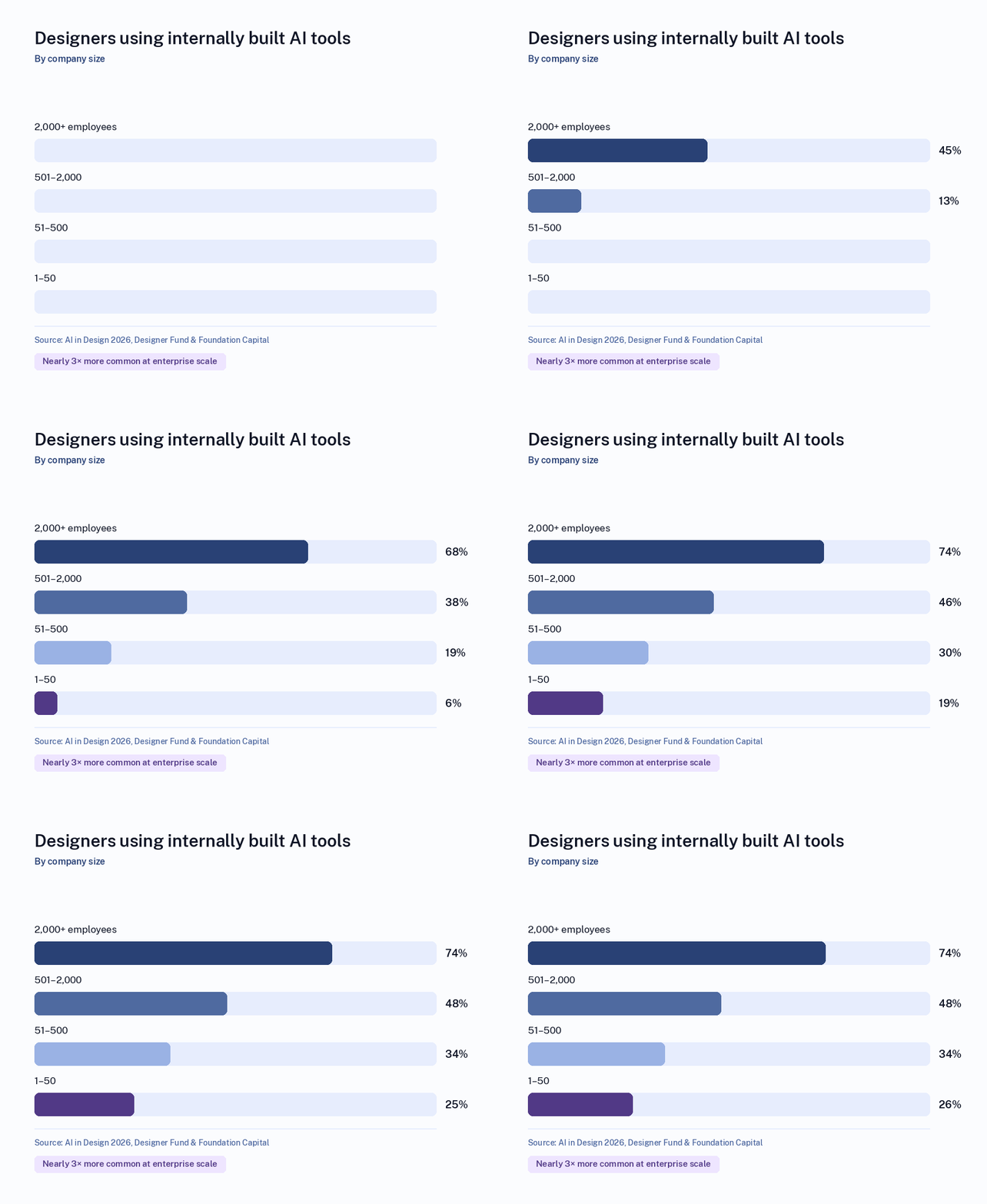
If you’re evaluating a design or engineering partner, we’ve learned from the AI in Design 2026 report that “74% of designers at enterprise companies (2,000+ employees) use internal tools, compared to just 26% at small organizations (up to 50 employees)—a 5x difference.” The report’s read on why is straightforward: security, compliance, and budget constraints push larger organizations toward building their own governed tooling rather than adopting whatever off-the-shelf AI product is trending that quarter.
That gap is a preview of a decision every enterprise buyer is going to face, whether they’re building a design function in-house or hiring a partner for one. Off-the-shelf AI tools move fast and are easy to pilot, but they come with real exposure: data handling terms that change, output quality that’s inconsistent (62% of designers surveyed cite this as their top AI challenge), and no guarantee the tool exists in its current form next year. Internally governed tooling is slower to stand up but gives an organization actual control over where client or product data goes and how AI-generated work gets validated before it ships.
A consultancy’s answer to that trade-off says a lot about how it will handle your project. Ask whether AI-assisted work goes through the same review and quality bar as anything else, and how the firm handles security review for the tools it brings into a client relationship. If the honest answer is “we let each designer pick their own AI tools,” that’s a shadow-IT problem you’re inheriting along with the deliverable.
What to Ask a Design Partner About Their AI Tooling
The report’s own advice to designers evaluating a new AI tool is close to word-for-word the advice a client should apply when evaluating a design partner’s tooling maturity: judge it against the actual workflow, not the quality of a polished demo, and compare consistency, controllability, and how much refinement is needed to get to production-quality work, not just the “wow” moment.
In practice, that turns into a short list of questions worth asking any firm bidding on design or product work in 2026:
- What’s your process for approving a new AI tool for use on client work, and who signs off?
- How do you handle client or user data that passes through a third-party AI tool during design or research?
- What does human review look like on AI-assisted deliverables before they reach us?
- If the tool you’re using today gets discontinued or changes its terms, what’s your fallback?
- Are you standardized on a governed stack, or is tool choice left to individual designers?
A partner that can answer these cleanly has almost certainly already been through the governance conversation internally. One that hasn’t is still figuring it out in real time, on your project.
Why Tool-agnostic Matters More, Not Less, Right Now
The instability in the AI design tool market is exactly the environment where being tied to one vendor’s roadmap becomes a liability. A firm whose whole practice is built around a single AI-design platform is betting your project on that platform’s roadmap, pricing, and continued existence. A tool-agnostic approach, evaluating and combining tools like Claude, Figma’s MCP-connected workflows, and Miro’s AI-assisted prototyping based on what a specific project actually needs, is a more defensible position when nearly half of designers industry-wide say they’re still searching for their own go-to stack.
That’s also, not coincidentally, the difference between a design essential and a design trend. The mouse, the Sharpies, the AI layer: none of them matter because they’re the newest thing available. They matter because someone has actually tested them against real project pressure and kept what held up. The same standard is worth applying to the partner you hire, not just the tools sitting on their desk.
✨ AI Post Recap
When hiring a design or engineering partner in 2026, evaluate their AI governance rather than their toolstack. Designers’ AI tool counts more than doubled in a year, from 3 to 7, and 91% now use AI weekly, so any list of tools a firm shows you will be out of date within months. What holds up is process: a named approval step for new AI tools, a clear rule for client data, human review on AI-assisted deliverables, and a tool-agnostic stance that doesn’t tie your project to one vendor’s roadmap.
What should I ask a design agency about their AI tools before hiring them? Ask who approves a new AI tool for client work, how client and user data is handled inside third-party tools, what human review happens on AI-assisted deliverables, and whether tool choice is standardized or left to individual designers. Vague answers signal a shadow-IT problem you would inherit.
Why do enterprises build their own AI design tools instead of buying them? Security, compliance, and budget constraints. The AI in Design 2026 report found 74% of designers at companies with 2,000 or more employees use internally built AI tools, versus 26% at organizations under 50 people, a fivefold gap.
Is it risky to hire a design firm built around one AI platform? Yes. A firm tied to a single AI-design platform bets your project on that platform’s pricing, roadmap, and survival. With 62% of designers reporting inconsistent output quality and tools turning over every few months, a tool-agnostic partner is the more defensible choice.
