

There’s a wave of writing right now about “harness engineering” — the idea that the infrastructure wrapped around an AI agent matters more than the model underneath it. The data is hard to argue with. Vercel deleted 80% of their agent’s tools and watched accuracy jump from 80% to 100%. OpenAI published a dedicated post on harness engineering. Anthropic wrote a guide. Birgitta Böckeler at Thoughtworks weighed in. The conclusion across all of it: build the right environment for your agent, and the model almost becomes a secondary concern.
These pieces are worth reading. But most of them describe solutions that require meaningful infrastructure investment — custom evaluation pipelines, sandboxed execution environments, context compaction layers, external observability platforms, model-layer tool filtering. They’re written by practitioners who already have agentic workflows running in production. If you’re just getting started, they tell you where you’re headed. They don’t tell you where to begin.
What I want to describe is a self-improving agent workflow: one that requires no external tooling, and that generates — as a byproduct of use — the knowledge you’d need to eventually build the things those articles describe.
The Instinct Is Already There
Rob Herbig recently wrote about this problem from a different angle — he called the pattern “process debt.” The same way skipping the refactor step in a coding session leads to technical debt, skipping reflection on your AI workflow means solving the same problems over and over without compounding. He surveyed colleagues and found people arriving at the same underlying instinct from completely different directions.
Wes Hoffman, an engineer on my team, had his agent generate lessons-learned documents after each session, then fed those back in to improve the next one — a manual feedback loop. Nathan Sickler, a delivery lead on another project at SEP, built an instruction that appended a self-assessment to every response: a confidence score, any assumptions made, and one concrete improvement to the instructions. He found the assumptions section alone was worth the overhead.
I was part of that conversation too. I described a technique of forking a session when something goes sideways — starting a fresh parallel chat to test a fix without disrupting the current one — working out an improvement in the forked session, then returning to the original with updated configuration. Same instinct — different mechanism.
What all of these share is a manual trigger. Someone has to remember to do it. What I’ll describe is a way to bake the loop directly into the workflow so it runs whether you think about it or not.
Rethinking the Question
Most people approach agentic tooling as a knowledge problem: what does the agent need to know? In my experience, a more reliable question is: what road should the agent walk?
The shift matters because of what it implies about the agent’s role. A knowledge-first approach assumes the agent will figure out the right sequence on its own — ideate, plan, act — as long as it’s well-armed enough. A path-first approach starts from the opposite premise: the agent can do each step exceptionally well if you tell it exactly what the step is. Name the step, confine the scope, trust the execution. When you’re explicit about the path, each step gets deliberate attention rather than being something the agent has to infer alongside everything else.
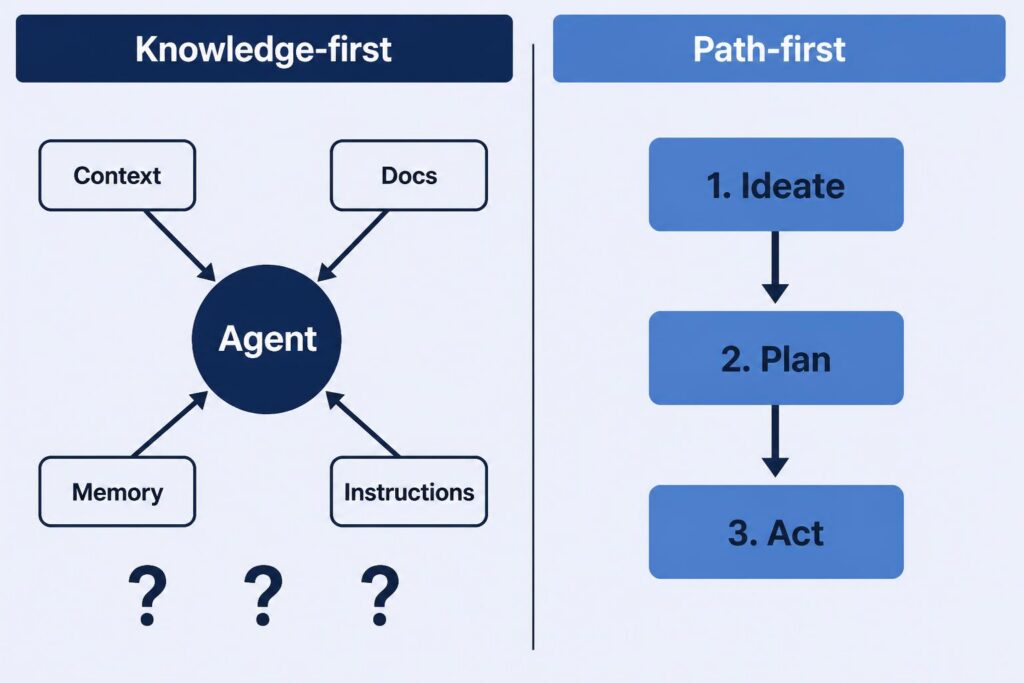
This is the mental model I wrote about in AI Agent Collaboration Starts with the Right Mental Model — treating the agent as a capable collaborator that does its best work when you’re specific about what you’re asking it to do, rather than assuming it should figure out what you didn’t say. Defined steps are how that principle plays out at the workflow level.
The same logic scales further. When the whole task is a defined path — a sequence of steps with a beginning and an end — you can attach learning directly to the path itself.
The Framework: A Self-Improving Agent Workflow
In most AI coding tools, skills are a mechanism for giving an agent specialized instructions or domain knowledge on demand. What makes them interesting for our purposes is when they load: not always, but only when the task calls for it.
This is worth sitting with. An always-on instruction or persistent memory system loads its knowledge into the agent’s context regardless of what’s being worked on. A skill stays dormant until the agent decides it’s relevant. That means a skill’s accumulated knowledge — including everything it’s learned from past sessions — never contaminates the context when it isn’t needed. Each skill’s lessons live in their own lane.
In my experience, skills tend to fall into one of two patterns: a resource of specialized knowledge the agent draws from while pursuing a goal, or a step-by-step process the agent follows to complete a goal. There are certainly other patterns. But the step-by-step format is particularly convenient for what we’re trying to do here, because it has a natural beginning and a natural end. That structure gives us exactly what we need to attach a learning mechanism.
The pattern looks like this:
Step 1: Read lessons learned from previous sessionsSteps 2–N: The actual work
Step last: Reflect on what happened and write any new lessons learned
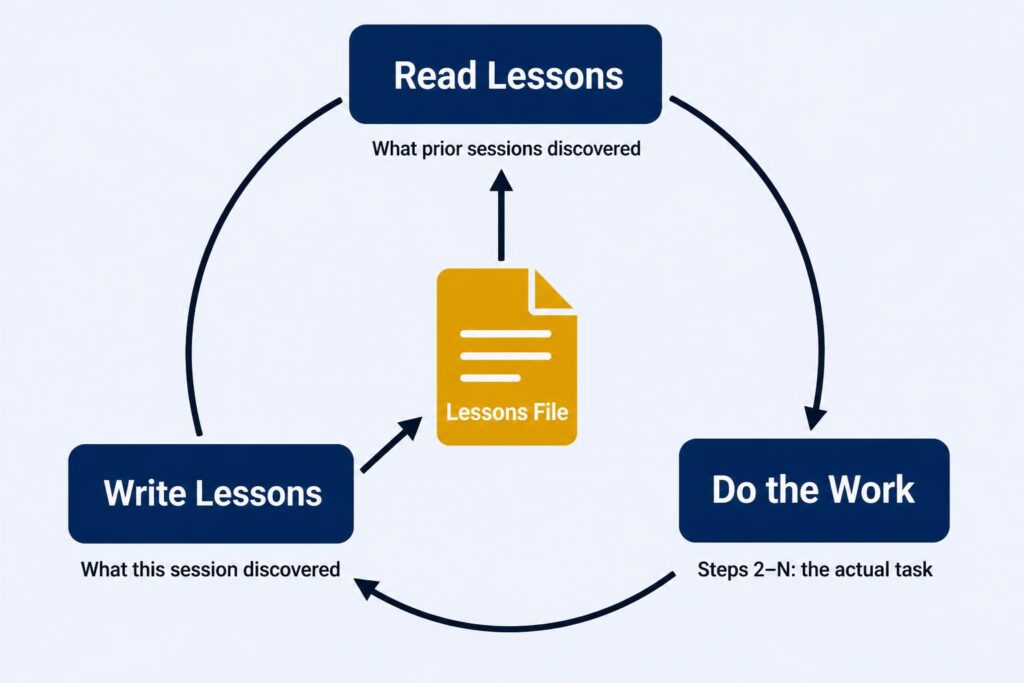
That’s it. The first step arms the agent with everything prior sessions discovered. The last step captures anything this session discovered. Every use of the skill potentially improves it — and crucially, you don’t have to get the skill right on the first try. The skill will surface what needs to change and remember it for next time.
A Real Example: The Database Dev Tool
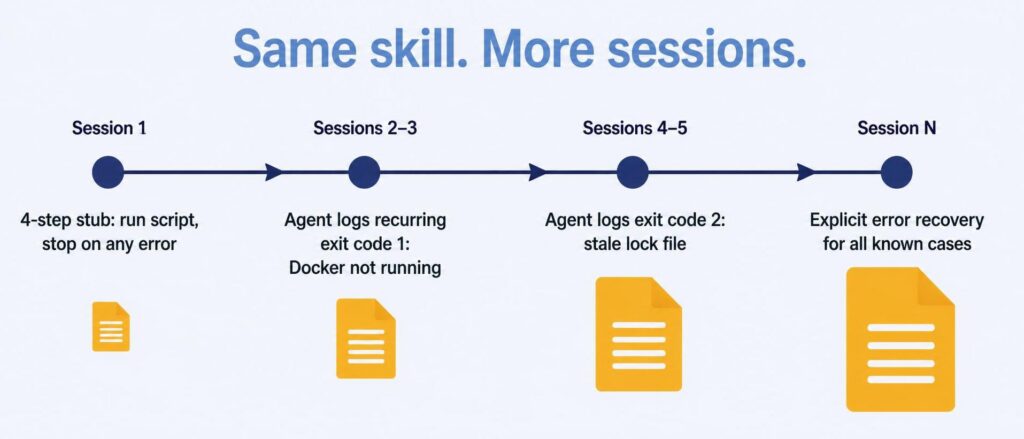
Our team has a PowerShell script that resets the local development database to a clean state. Simple enough. My first version of the skill for it had four steps:
- Read lessons learned
- Run
regenerate-database.ps1 - Interpret the exit code — zero means continue, anything else means report the error and stop
- Write lessons learned
The first version just stopped on non-zero exits. Over a few sessions, the agent started logging what those exit codes actually meant. One recurring entry: Docker wasn’t running, so the script couldn’t reach the resources it needed. Another: a stale lock file from a previous failed run.
Eventually I worked with the agent to update the skill’s else-block to handle specific cases rather than stopping blindly. Then another case showed up, and another. What started as a four-step stub became a skill with real error recovery — not because I anticipated those failure modes upfront, but because the skill catalogued them as it encountered them.
The structure now looks roughly like:
1. Read lessons learned2. Run regenerate-database.ps13. Interpret results - Exit code 0: continue - Exit code 1 (Docker not running): start Docker, retry once - Exit code 2 (stale lock file): clear lock, retry once - Other: report to user with exit code and last log lines, stop4. Write lessons learned
This is a skill that wrote its own error handling over time, through use.
Everything Is a Workflow
Here’s where it gets interesting at scale.
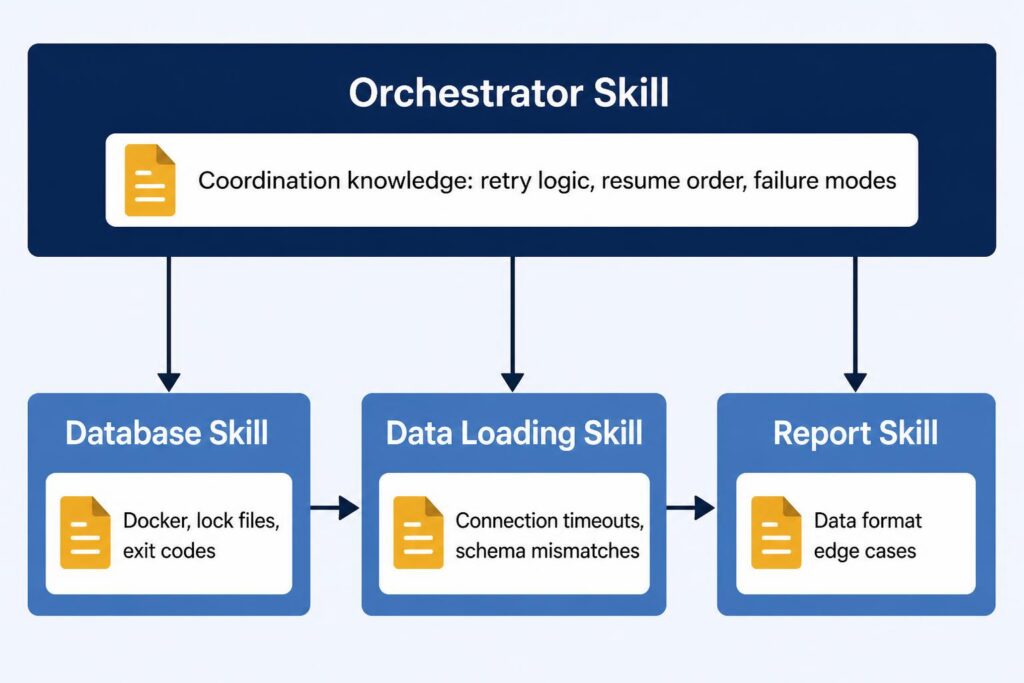
That database skill doesn’t exist in isolation. There’s another skill on my team for pulling production data into the local dev environment — a more involved process that needs a clean database schema before it can begin. So it invokes the database skill first as a dependency, then runs its own steps, then writes its own lessons learned. The database skill’s improvements automatically improve every workflow that depends on it, without those parent workflows doing anything extra.
Add a third skill — generating reports from the loaded data — and you have a chain: reset the schema, load production data, generate reports. Each skill has learned about its own domain. The database skill knows about Docker and lock files. The data-loading skill knows about connection timeouts and schema mismatches. The report skill knows about edge cases in the data format.
You can wire these together by having each skill call the one before it, or — as complexity grows — you can create an orchestrator skill: a step-by-step workflow whose only job is to invoke the others in the right sequence.
The orchestrator has its own learning loop, but not about the sub-tasks — those skills handle their own learning. The orchestrator learns coordination knowledge: what state gets left behind when a step fails, how to resume without re-running steps that already succeeded, and which failure patterns mean “try again” versus “stop and ask the user.” That’s a different category of knowledge — and keeping it separate is what makes each skill accurate.
As you build out more skills, you’ll notice the gaps between them. Those gaps are often workflows waiting to be defined. Over time, a library of sharpening skills and a few orchestrators can automate a substantial portion of a daily development process.
There’s a team dimension too. Lessons learned files can be shared through version control, which means every colleague’s sessions contribute to a shared knowledge base. The more people use a skill, the sharper it gets for everyone.
The Skill for Learning Itself
Here’s a detail I find genuinely elegant: the mechanism for lessons learned is itself a skill — a step-by-step workflow that defines how to read, reflect, classify, and write lessons in any other skill. You can view it here.
It uses a two-tier file structure: one file shared across the team through version control, and another that’s gitignored and personal to you. When you run a skill, you read both. When you write lessons, you route each observation to the right file — team-relevant and codebase-agnostic learnings go in the shared file; user-specific context that wouldn’t mean much to your teammates stays local.
The lessons-learned skill follows its own pattern. It has its own LessonsLearned.GLOBAL.md — tracking how the concept of lessons learned has evolved through use. The system for learning is itself a learning system.
Where This Can Go
Once the loop is running and accumulating real history, a few directions start pulling at you. These aren’t features to design upfront — they’re things you’ll find yourself reaching for.
The loop itself can improve. Scope lessons by project area. Track which ones keep surfacing versus which ones fade out. Build a refinement skill that periodically reviews the pile and folds the durable entries back into the skill body. The loop improves your workflows; these improve the loop.
Lessons can grow teeth. A lesson in a file is a suggestion — the agent reads it and may apply it. When the same issue surfaces anyway, that’s a signal to promote it: from a lesson into an explicit rule in the skill, and from a rule into a hook if it needs to be enforced rather than just remembered. The path from “the agent keeps making this mistake” to “the agent structurally cannot make this mistake” is gradual, but navigable.
Once you’re thinking in skills and the lessons are accumulating, a larger design space comes into view.
Agent configuration becomes intentional. The skills define what the agent does. Once you start shaping how it shows up — its posture for a given task, its tool access, what it’s actually allowed to do — you’re building what the harness engineering articles describe. You’ll have arrived there from the inside out, with enough context to know what you’re actually solving for.
One Loop. Start There.
The appeal of this approach is that it doesn’t require you to know what you’re doing before you start. Building a custom evaluation pipeline or a context compaction layer requires knowing what you’re optimizing for — and that knowledge is most reliably built through having run workflows long enough to observe what breaks. The skill-based loop generates that knowledge for you, incrementally, as a byproduct of using it.
The harness engineering literature is pointing at something real. The destination is worth aiming for. But you don’t have to parachute into the middle of it.
One skill. One loop. Write the steps you know today, attach the learning mechanism, run it. The skill is designed to surface what you missed — and even when it doesn’t catch everything, each run builds the record the next one works from. You don’t have to figure it all out before you start — that’s the whole point.
The rest follows.
