

AI, LLM, Context, Agent, Harness… If you can’t pin down a precise definition for any of those words, keep reading.
The workplace has been flooded with new AI terminology. To add confusion, many of the words get used interchangeably. Words are important. It’s how we communicate. It’s how we make sure everyone is on the same page. So let’s start with the basics and build a common vocabulary that everyone can work from.
AI and LLMs
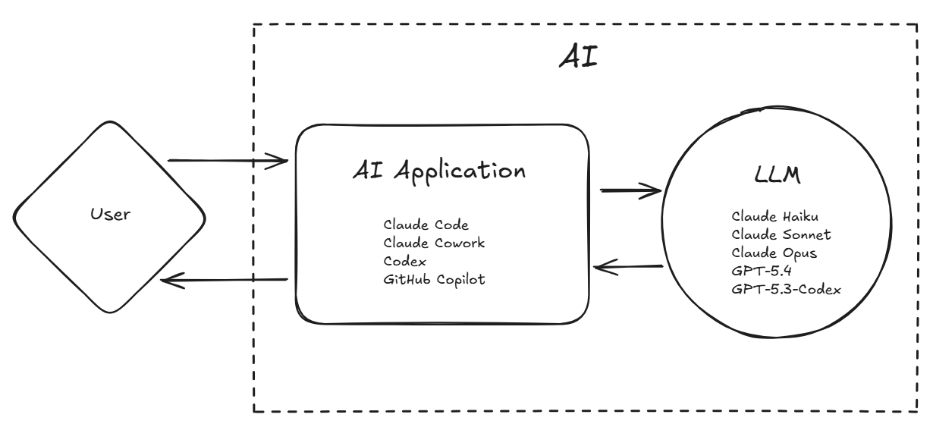
AI
It’s an acronym for Artificial Intelligence. Superficially, this is the most straightforward term. In reality, this term is overloaded in a dozen different ways. We’ll stick with a simple definition. It refers to software that exhibits behaviors akin to humans. More specifically, most modern-day references use it to describe generative programs — software that writes documents, code, images, presentations, or even runs a program like you would.
LLM
Stands for Large Language Model. Sometimes referred to simply as “Model.” This is a program that takes text in and generates text out, but at a much more primitive level than a user ever sees. Think of the processor in your computer. There are a lot of parts to the computer (hard disk, RAM, mouse, and keyboard), but all of it feeds into the processor, and the processor outputs what the computer does. This is the LLM.
Anthropic
Anthropic is the company that created the Claude family of LLMs, as well as accompanying applications: Claude web chat, Claude Code, Claude Cowork.
OpenAI
OpenAI is the company that created the GPT family of LLMs, as well as accompanying applications, such as ChatGPT and Codex.
Claude
Anthropic’s family of LLMs. There are three that are commonly used:
- Claude Haiku – Faster but less capable of handling complex tasks.
- Claude Sonnet – Less fast but more capable of complexity. This is the workhorse that can handle most tasks.
- Claude Opus – Slowest but able to handle very complex tasks.
GPT
OpenAI’s family of Models. There has been more variety in naming with these, but usually people are going to talk about:
- GPT-5.X – Where X is the current revision. We’ve been in the 5.X range for a while now. In the past, there were GPT-4, GPT-3, etc.
- GPT-5.3-Codex – This is an LLM that specializes in generating code. We are currently on version 5.3 as of this writing.
AI Applications
Claude Code
Claude Code is an application created by Anthropic to generate source code in whatever programming language is desired. The application uses Claude LLMs to take user requests and generate working code. The application usually looks like a text-based terminal, but VS Code and Desktop versions exist as well.
Claude Cowork
Claude Cowork is a desktop application created by Anthropic to generate documents, spreadsheets, presentations, etc. It’s sophisticated enough to consume existing business artifacts from your computer, then analyze them, and generate new documents based on user requests. It helps the user manage these document artifacts in a single application as well.
ChatGPT
ChatGPT is an application created by OpenAI to allow users to converse with the LLM in a natural human way. The application is commonly used through a web browser or mobile app. Users can give ChatGPT text, images, documents, video, and more, and ask questions about them. It can also generate documents and Artifacts like Cowork. The difference is that ChatGPT is more general use, while Cowork has additional features to assist with complex business processes.
Codex
Codex is an application created by OpenAI to generate source code in whatever programming language is desired. It is a direct competitor of Claude Code. They share similar use cases and feature sets. Codex utilizes the GPT-X.Y-Codex LLM flavor that was specifically designed for code generation.
GitHub Copilot
GitHub Copilot is Microsoft’s entry into the AI code generation application space. Copilot is primarily used with VS Code to generate source code and other documents for a code repository. It does not have a Model family of its own. Instead, users can choose between either GPT or Claude Models.
Our mental model we have developed so far.
Prompts and Context
Prompt
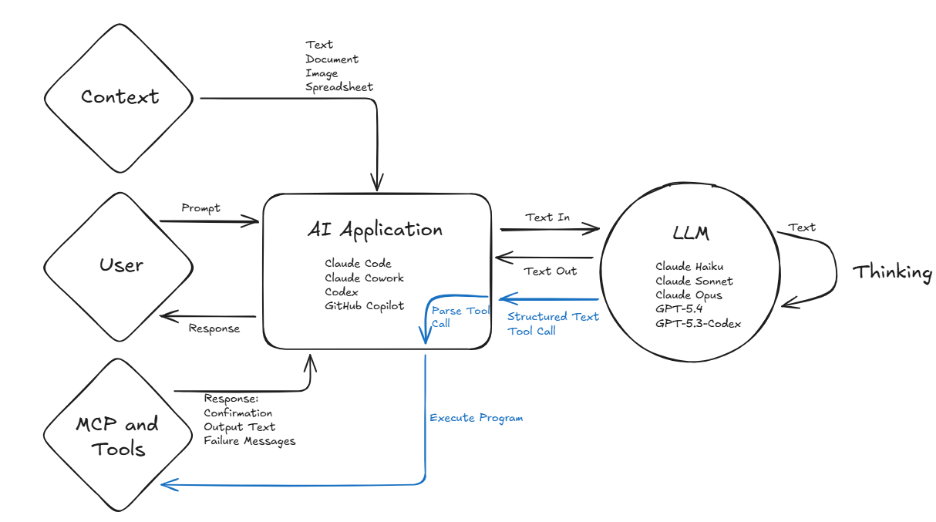
This is the text you send to the LLM through some AI application. For example, asking ChatGPT, “What is the most popular programming language?” is a Prompt.
Context
Anything that goes along with your request for the LLM to be processed. For example, if I had a spreadsheet of financial data, I could give the spreadsheet to an AI application (like Claude Cowork) and ask it, “Which months had the most expenses and what were they?” Asking about expenses is the Prompt, and the spreadsheet with the data is the Context. Context can be images, source code, copied and pasted text, etc.
Context Engineering
The practice of crafting a high-quality Context for your Prompt to improve the quality of the result. This is a nuanced activity. While there is guidance, it is more of an art than a science. The main goal people have agreed on is that you want to convey the most information with the least amount of data. Achieving that is successful Context Engineering. Giving the AI application every document on your computer would be poor Context Engineering.
Thinking and Tool Calling
Thinking
Some clever people noticed that when you tell the LLM to output all the steps to reach its conclusion, you get better results. This technique is called Chain-of-Thought (CoT). Looking at the intermediate steps looks like the LLM is talking to itself or “Thinking” through a solution. Over time, Thinking has become a first-class feature of LLMs and they will do it naturally to get to a solution.
Tool and Tool Calling
Some more clever people had the idea that you could give an LLM some structured text that describes a program that could be run and how to run it. Then, while conversing with the LLM, if at some point that program would help the LLM, the LLM can output the expected structured text to run the program. The AI application, like Claude Code, will parse the output text for that structured program reference, and if it sees it, will run the program on behalf of the LLM. The output of the program is then provided back to the LLM to continue Thinking through the solution. In short, the executable program is the Tool, and the process by which the LLM determines when and how to run it is Tool Calling.
This gives the LLM huge leverage because now it can influence its environment and run software as a person would.
MCP
Stands for Model Context Protocol. This is a standardized way to provide LLMs and AI applications tools for their disposal. MCPs are usually remote servers that can be called out to by the AI application and provide integrations with other systems, like a ticketing system, email, or source control.
Things are beginning to get more complicated.
Agents and Agent Infrastructure
Agent
When you add an LLM plus AI application plus Thinking plus Tools, you start to get something that can perform very sophisticated activities for extended periods of time. It starts to become more autonomous and thus the Agent is born.
An Agent can be thought of as a single instance or session of an LLM attempting to solve a problem presented as a Prompt through iterative cycles of Thinking and Tool Calling to develop its own Context and eventually reach a solution.
The term “Agentic” describes software or business processes that leverage Agents. Agentic code generation is the creation of source code using Agents. Agentic workflows are the execution of business processes by Agents.
Custom Agent
You can create a Custom Agent by saving a pre-canned Prompt along with configurations like which LLM to use and what Tools are available. This saves users time by allowing them to execute the Agent with their chosen AI application without needing to generate a Prompt every time.
Subagent
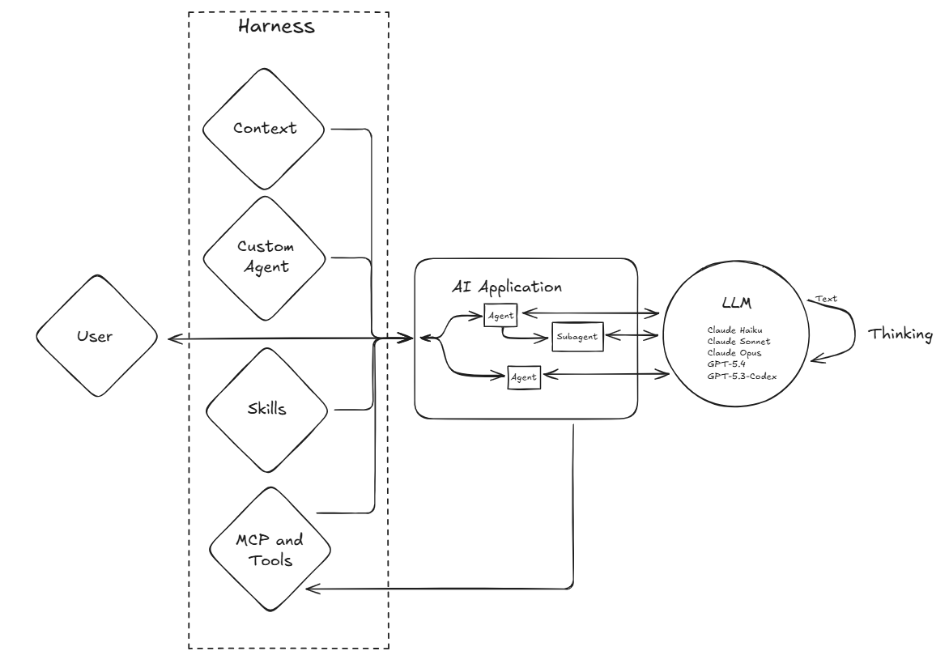
Software people love recursion. What happens if you create a Tool that lets the LLM decide to make its own Agent? Now you have Agents that can make Agents. These Agents spawned by Agents are known as Subagents. They operate exactly like normal Agents, but the user doesn’t usually interact with them. This is commonly done as a Context Engineering technique. Dividing a problem among Subagents can better satisfy the Context Engineering goal of “provide the most information with the least data.”
Skill
While a Tool is a structured program the LLM can choose to use, a Skill is a structured process the LLM can choose to use. A Skill has a section called Frontmatter that is provided to the LLM when you send a Prompt. The Frontmatter includes a description of what the Skill is and when to use it. If at some point the LLM decides the Skill is needed to solve the problem, the rest of the Skill text is given to the LLM, which contains all the details to solve the problem through a pre-determined process. For example, you could have a Skill that details how and what information is needed for creating a ticket of a particular type. If there is a regular process you perform to aggregate some spreadsheets, this could be made into a Skill.
Harness
Let’s take a big, complicated code base. Create some Custom Agents for it, sprinkle in some custom Skills that are specific to that domain — maybe some Subagents are part of the party as well. You have now created a substantial amount of custom infrastructure to support your Agentic development. This has now become sophisticated enough to be called a Harness.
A Harness is the custom infrastructure built around Agents to better guide them towards success in your specific domain. It is commonly referred to in code development, but it could apply to sophisticated business processes as well.
Harness Engineering
The practice of creating custom infrastructure with the goal of more autonomous and higher quality Agentic generation. This becomes a non-trivial task as processes become longer, more complicated, and higher in consequence of failure. There are, additionally, feedback cycles that need to be managed, such as providing the most relevant Context to the Agents and updating the Custom Agent and Skill configurations as the domain evolves.
Everything we have discussed so far is still at play, but now the harness, agents, and subagents take center stage.
Encore
OpenClaw / Claw
OpenClaw is an application created to maximize the autonomy and integration of Agents. The Agent runs on your computer and can run indefinitely while connected to a myriad of systems. A user can send requests while it is running to guide its behavior. OpenClaw gained a lot of popularity by demonstrating some astounding behavior when an Agent is left unchecked with all the Tools in the world. The obvious risk is that you have an unchecked AI Agent freely executing programs as it desires.
Claw is shorthand for OpenClaw and variant applications with similar behavior.
AI terminology is still being written. New terms will emerge, existing ones will splinter into subspecialties, and half of these definitions will look dated in two years. That’s fine. What matters is having a foundation to build on, a shared vocabulary your team can update together as the technology changes.
✨ AI Post Recap
AI has a vocabulary problem — the same words mean different things depending on who’s using them. This piece builds a shared foundation: from LLMs and prompts, through context engineering and tool calling, up to agents, subagents, skills, and harnesses. The goal isn’t to memorize definitions, it’s to give teams a common language to build from.
What is an AI agent? An AI agent is a single instance of an LLM solving a problem through iterative cycles of thinking and tool calling — using tools to interact with its environment, building its own context, and working toward a solution without requiring step-by-step human direction.
What is context engineering? Context engineering is the practice of crafting high-quality input to improve AI output — the goal is to convey the most relevant information with the least amount of data. Dumping everything into a prompt is poor context engineering; precise, well-scoped input is good context engineering.
What is an AI harness? An AI harness is the custom infrastructure built around agents to guide them toward reliable results in a specific domain — including custom agents, skills, subagents, and configurations tailored to a particular codebase or business process.
