

With the rising costs of frontier models, people are naturally looking for alternatives. The landscape is vast, but finding good, workable solutions is tough — partly because of said vastness, and partly because it can be very difficult to judge whether any particular setup works well enough. Note that I said “setup” and not “model”, as that was very much intentional. When dealing with agentic software development, the model matters most, but the harness shapes how much of that capability you actually get to use. And when running local LLMs, the inference engine is just as important. Model runtimes are less critical, but they still play a very useful role.
Before we go on, let’s take a step back and define some terms. I will caution that these are my definitions, and while they match those of many other people, they are not universal. In fact, my colleague Andrew Dunlap recently wrote a post with somewhat different definitions. We as an industry are still in the process of figuring out a cohesive terminology. From highest-level to lowest-level:
- Agent/harness: this is the software we interact with most directly while developing. It’s Claude Code, it’s Codex, it’s various VS Code extensions and forks.
- Model runtime: optional, but very helpful in downloading and setting up LLM configurations. This would include Ollama, LM Studio, and Lemonade, to give a few examples.
- Inference engine: the model host, responsible for loading and directly interfacing with the LLM. Examples include llama.cpp and vLLM.
- LLM/model: it’s… the actual trained neural network. However, in practice, this oftentimes includes additional metadata, such as chat templates.
To add to this list of variables, we have hardware. Physical devices have to run all of those things. Just being able to intelligently pick the right hardware is a non-trivial task, never mind the increasing costs in this space, too. Graphics cards can do a lot, but they tend to be limited by the amount of video RAM, or VRAM, that they have. If the entire model (plus context, etc.) can’t fit into VRAM, then inference speed plummets. Data center-grade hardware is generally out of reach for most people. Computers with unified memory have recently become popular for local inference. Unlike traditional PCs with separate system RAM and graphics VRAM, they are architected such that their total amount of RAM is freely assignable between the CPU and GPU, which tend to be on the same physical module. The NVIDIA DGX Spark, their upcoming RTX Spark, AMD’s Strix Halo and upcoming Gorgon Halo, and some recent Apple Silicon Mac hardware are designed like this. We can get devices with 128GB or more of unified RAM and use a substantial portion of that for LLMs. And with that, let’s get into the specifics.
The hardware and OS
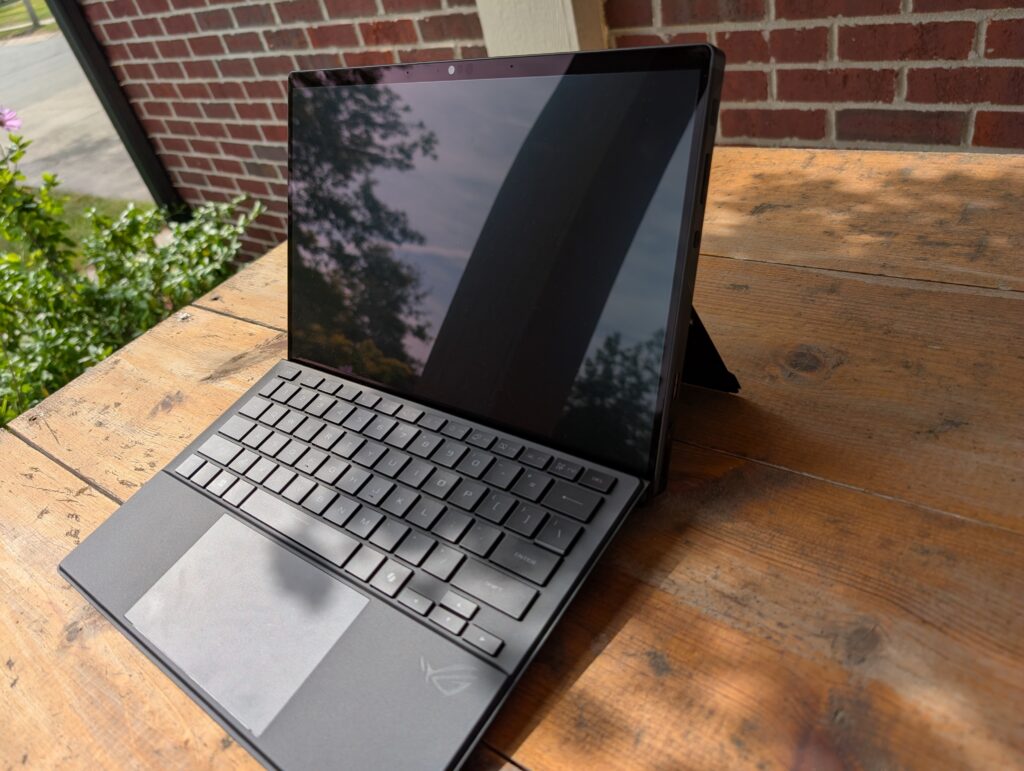
The hardware I chose to invest in for the purposes of running local LLMs is a strange little Asus tablet called the “ROG Flow Z13 (2025)”, which is built on the AMD Strix Halo platform. It’s marketed as a gaming tablet, but it also has a high quality dual input pen-and-touch screen (most useful for designers; stylus not included, though) and the specific version I got has 128GB of LPDDR5X RAM, which I doubt is needed for any game or for most design activities. It’s pretty much perfect, however, for running LLMs.
Anyone who has attempted to run AI models on non-NVIDIA hardware knows that it’s an uphill battle. CUDA is everywhere, and thus it ends up being the default that most people target. I initially tried to do everything in Windows, but found that to be rather limiting. The AMD ROCm (analogous to CUDA) build of llama.cpp would regularly throw out-of-memory (OOM) errors even when I explicitly limited the amount of data being loaded. The Vulkan build had a rather nasty bug where, if I attempted to load too much data, that would result in a complete system lockup instead of OOM errors — clearly an even worse experience.
Finally, after running into one too many problems getting the combination of Windows, WSL2, and ROCm to all work correctly, I gave up on Windows and installed Linux. Multiple times. Most distributions I tried had major driver issues, but I eventually settled on CachyOS, an Arch-based gaming distro that was easy enough to tweak and get the hardware to a good state.
The software
After getting the operating system dialed in, I started looking at the options for finding, downloading, and hosting models. After a decent amount of back and forth, I settled on using Lemonade 🍋 as my model runtime of choice. It has the ability to use multiple inference engines, has dedicated support for the Neural Processing Unit (NPU for short, a specialized hardware accelerator for AI workloads) on the newer Ryzen-based machines, and AMD engineers contribute to its development.
The first thing I tried was essentially what I had tried in Windows. Unfortunately, the Linux ROCm build of llama.cpp had the exact same OOM issue. Thankfully, the Vulkan build proved to be more stable and could automatically determine an appropriate amount of memory to allocate without freezing the entire computer. (I did attempt to do some manual optimizations, but those resulted in the same lockups I saw in Windows, which was very disappointing.)
In addition to llama.cpp, I used FastFlowLM to run a small model on the NPU. I experimented with running some of the vLLM models as well as the very early stage MLX engine ones, but those didn’t seem to be any better than what I had already seen with llama.cpp, so I decided to focus on it more fully. That’s where the next set of choices would need to be explored: models.
The models
This is where the real challenge begins. There are a gazillion different models and finetunes and quantizations and all kinds of fun stuff. For developing software today, there are a few ways to narrow down this enormous list. First, if a model is trained for a very specific task, such as medical analysis, it’ll probably be bad at software. It likely won’t even support tool calling. So those can be ignored. Second, it’s best to ignore the smaller models (1B parameters and below) as well as overly quantized models (like 1-bit) because they tend to be too simplistic. Finally, extremely large models can be ignored as well, sadly, because they simply will not fit in any reasonable amount of VRAM. Kimi K2.7 Code and GLM-5.2 both require well over 300GB VRAM for versions that aren’t too quantized to be of use, for example.
So where does that leave us? In the sweet spot, of course! Some models are large enough to be useful, yet small enough to fit in 128GB (and often much less) VRAM. Qwen3.6 is one such family of models. I’ve used Unsloth’s 35B MoE GGUF model with very good results. The Q8_K_XL quantization runs at a respectable speed. There’s also a Qwen-based model called Ornith, which claims to work well, although I haven’t tested it much yet. Another promising model is Step-3.7-Flash from StepFun, one of the “Six AI Tigers“. While I can run the IQ4_XS quantization, it’s not quite as speedy as Qwen. Most recently I’ve been playing around with DeepSeek-V4-Flash, although the IQ3_XXS quantization runs rather slowly, and I’m not willing to go to anything even more quantized. Also, I’ve occasionally seen it switch to Chinese even when I asked a question in English, which I found to be entertaining. For a while, a quantized version of GPT-OSS 120B was interesting to run, but it’s a bit outdated now. NVIDIA Nemotron 3 Super‘s Q4_K_XL quantization runs at an okay speed on the tablet. Here’s how they actually perform, leaving out Ornith and GPT-OSS, since I don’t have solid numbers for those:
| HF 🤗 Model | Parameters | Quantization | Context Window (Tested / Max) | Speed (tokens per second) | Notes |
| unsloth/Qwen3.6-35B-A3B-MTP-GGUF | 35B | Q8_K_XL | 256K / 256K | 45-55 | MoE (mixture of experts) with 3B active parameters, vision |
| stepfun-ai/Step-3.7-Flash-GGUF | 198B | IQ4_XS | 128K / 256K | 26 | MoE with 11B active parameters, vision |
| unsloth/DeepSeek-V4-Flash-GGUF | 284B | IQ3_XXS | 128K / 1M | 11 | MoE with 13B active parameters |
| unsloth/NVIDIA-Nemotron-3-Super-120B-A12B-GGUF | 120B | Q4_K_XL | 1M / 1M | 17 | MoE with 12B active parameters |
The ability to run some of these models is evolving rapidly. For example, llama.cpp added stable support for the DeepSeek model family very recently. Other models exist, too, that do not yet have good support. For example, Google’s DiffusionGemma isn’t supported by llama.cpp yet, and that would be very interesting to see, as it’s a diffusion-based language model that works by iterative denoising, rather than the usual autoregressive models that work by sequential token generation. (Yes, I had to look up some of those terms. I’ve used Stable Diffusion, so I’m familiar with the general concept, but words like “autoregressive” are not really part of my vocabulary.)
How well do all of these “sweet spot” models work for software development? Well, that’s not so easy to answer. Solving a simple bug, designing a brand new mobile app from scratch, and rewriting an existing web app in a different language/framework are all tasks that are worlds away from each other. The models all have their published benchmarks, although quantization affects performance significantly. And, in general, these models are pretty capable. But remember how I said at the beginning of this post that the harness shapes our ability to use models? That’s where my exploration is incomplete at this point.
The harness
Harnesses play a major role in how well any model behaves. They provide all the tool call metadata, the system prompts, and the user interaction experience. They also perform critical tasks such as context window management. I’ve been using the GitHub Copilot harness in VS Code for some time now, so I’m comfortable with it, and I’d like to continue using it with local models as well as GitHub-provided ones. This was somewhat problematic until literally a few days ago, when the latest version finally allowed the temperature and top_p parameters to be configured. The ability to set those parameters is extremely important and greatly affects model performance. Model cards will usually have recommendations for them, in fact. I had actually written a simple reverse proxy to forcibly rewrite those parameters in the requests sent to Lemonade to work around this problem. I’m glad it’s no longer necessary.
In my experience, the VS Code Copilot harness works pretty well with the models I’ve tried. I recall having some issues with Gemma 4 early on, but I haven’t tried that in a while. I’d like to explore other harnesses, such as OpenCode (which I tried briefly) and Pi, but I don’t have a time frame for that. As I said earlier, my exploration of harnesses is evolving and thus incomplete, so I can’t provide much detail about what is available and how well the different ones work. I would encourage everyone to explore the options out there. If you’re already comfortable in VS Code, stick with the Copilot harness. If you’re starting from scratch, OpenCode might be worth trying first.
The complete setup
Putting all the pieces together, here is the setup I’ve been working with:
- AMD Strix Halo machine with 128GB unified RAM
- CachyOS
- Lemonade
- VS Code Copilot
- Very small LFM2.5 model running on the NPU (for VS Code’s
chat.utilityconfigurations) - Various models for the “real work” running on the GPU
I am continuing to explore ways to improve the overall development experience, and I’m certain that this blog post will soon be outdated. But here’s the thing: local LLMs can already be used effectively for software development. They won’t match frontier models, but they don’t need to. Open-weight models are improving fast, and I’m excited to see what the future holds.
P.S. Want to learn more about open-weight models and how they are improving over time? Watch Andrew’s talk in which he discusses running a different set of models on NVIDIA DGX Spark hardware.
